HLS Transcoder
Open-source distributed video transcoding pipeline that turns S3-hosted videos into HLS streams using FFmpeg in Docker, with live progress over WebSocket.
- Node.js
- FFmpeg
- Docker
- Redis
- Socket.IO
- AWS S3
- React
Problem
Cloud-managed transcoders (MediaConvert, Mux, Cloudflare Stream) are convenient but charge by the minute and lock you into their CDN. For a self-hosted publishing pipeline I wanted three things they don't give you cheaply: full control of the FFmpeg flags that produce my segments, the ability to run the worker on cheap hardware (a $6 VPS or a spare laptop), and a live FFmpeg log stream in the browser so I can actually see what's happening when a job stalls.
The shape of the work is simple — accept a source video, run FFmpeg with the right flags, dump segments and a manifest somewhere a player can read. The hard part is making that distributable, observable, and safe to leave running unattended.
Approach
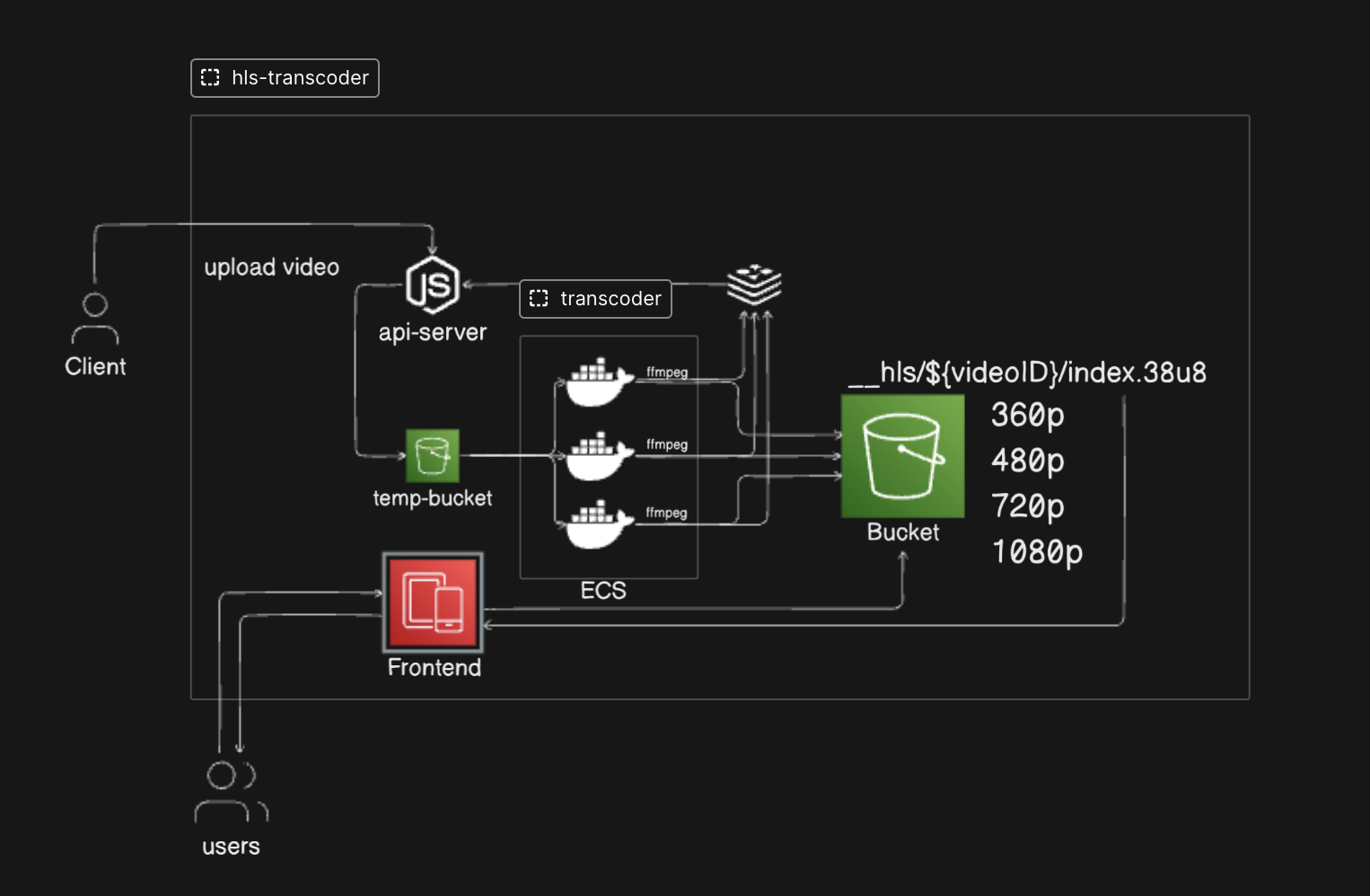
The pipeline is four moving parts wired together by Redis:
Browser → API Server → Redis (queue + pub/sub) → Transcoder Worker (Docker) → S3
              ↕ Socket.IO (live FFmpeg log stream)
- The user pastes the S3 URL of an already-uploaded source video into the UI and clicks Start Transcoding.
- The API server records the job in SQLite, generates a project slug, and spawns a one-shot
transcoderDocker container with the input URL and project ID. - The transcoder pulls the video from S3, runs FFmpeg (
libx264+aac→ HLS, 10-second.tssegments), and uploadsindex.m3u8plus segments back to S3 under__outputs/{projectId}/. - Live FFmpeg progress is published to
logs:{projectId}on Redis. The API server forwards those messages over Socket.IO to the browser. - When the upload finishes, the worker publishes the final
.m3u8URL on the same channel and the UI plays it back inline with video.js.
The FFmpeg invocation itself is conventional — -c:v libx264 -c:a aac -hls_time 10 -hls_playlist_type vod -hls_segment_filename .... The interesting design choice was making each transcoder a one-shot container instead of a long-lived worker pool: a job runs, writes its output, exits. This means crashes are isolated, scaling is trivial (run more containers), and there's nothing stateful to babysit between jobs.
Components
| Folder | Stack | Responsibility |
|---|---|---|
api-server/ | Node.js, Express, Socket.IO, SQLite | REST POST /transcode, Socket.IO log relay, job table. |
transcoder/ | Node.js, FFmpeg, AWS SDK | One container per job. Pulls source, transcodes, uploads, publishes. |
frontend/ | React, Vite, video.js, TailwindCSS | Form → live log stream → HLS playback. |
redis | Redis 7 | Job pub/sub channel logs:{projectId}. |
Key decisions
- One-shot Docker workers, not a long-lived pool. The API server
docker runs the transcoder image fresh per job. Crashes don't poison the next job. Worth noting: the API server mounts the host Docker socket to do this, which is fine for self-hosting but unsafe in multi-tenant deployments. - Redis pub/sub for logs, not WebSocket fan-out from the worker. The worker is short-lived and may run on a different host than the API server. Routing logs through Redis decouples them and keeps the worker stateless.
- VOD HLS, single bitrate, by default. Adaptive-bitrate ladders are a clean extension — the same FFmpeg run produces multiple renditions in parallel — but they 3× the CPU cost. Defaulting to single-bitrate keeps the demo cheap; the
outputknobs are wired up to add an ABR ladder when you want one. - SQLite, not Postgres. A self-hosted demo doesn't need a managed DB. SQLite ships in-process with the API server and the schema (jobs table) is small enough to fit on the back of an envelope.
Lessons learned
- The Docker socket mount is the part that bites you. Giving a public-facing API server the ability to
docker runis fine in a homelab and dangerous on the open internet. If you copy this design for anything multi-tenant, swap the socket for a sandboxed runner (rootless Docker, gVisor, or pushing jobs through a proper orchestrator). - Pub/sub channel naming matters more than you'd think. Using
logs:{projectId}lets the API server lazily subscribe only to the channels for jobs it's actively serving over a Socket.IO connection. A single broadcast channel works for one user; it doesn't scale. - Live logs are the killer feature. FFmpeg's stderr is dense and ugly, but watching it stream into the browser turned "is it stuck?" anxiety into ambient confidence. I'd ship that next time before I shipped anything else.
Architecture
Read the deep-dive
The companion blog post walks through building the FFmpeg-side of the transcoder from scratch in Node.js: Build an HLS Video Transcoder with Node.js and FFmpeg.